New in 0.1.16 AI chat about the whole PR

Ship releases that span dozens of repos.

Nonlinear is the release workbench for maintainers whose work doesn't fit in one repository. Triage PRs, untangle cross-repo dependency chains, pin submodules and review huge diffs, all in one place.

Free and open source · MIT · No GitHub App to install

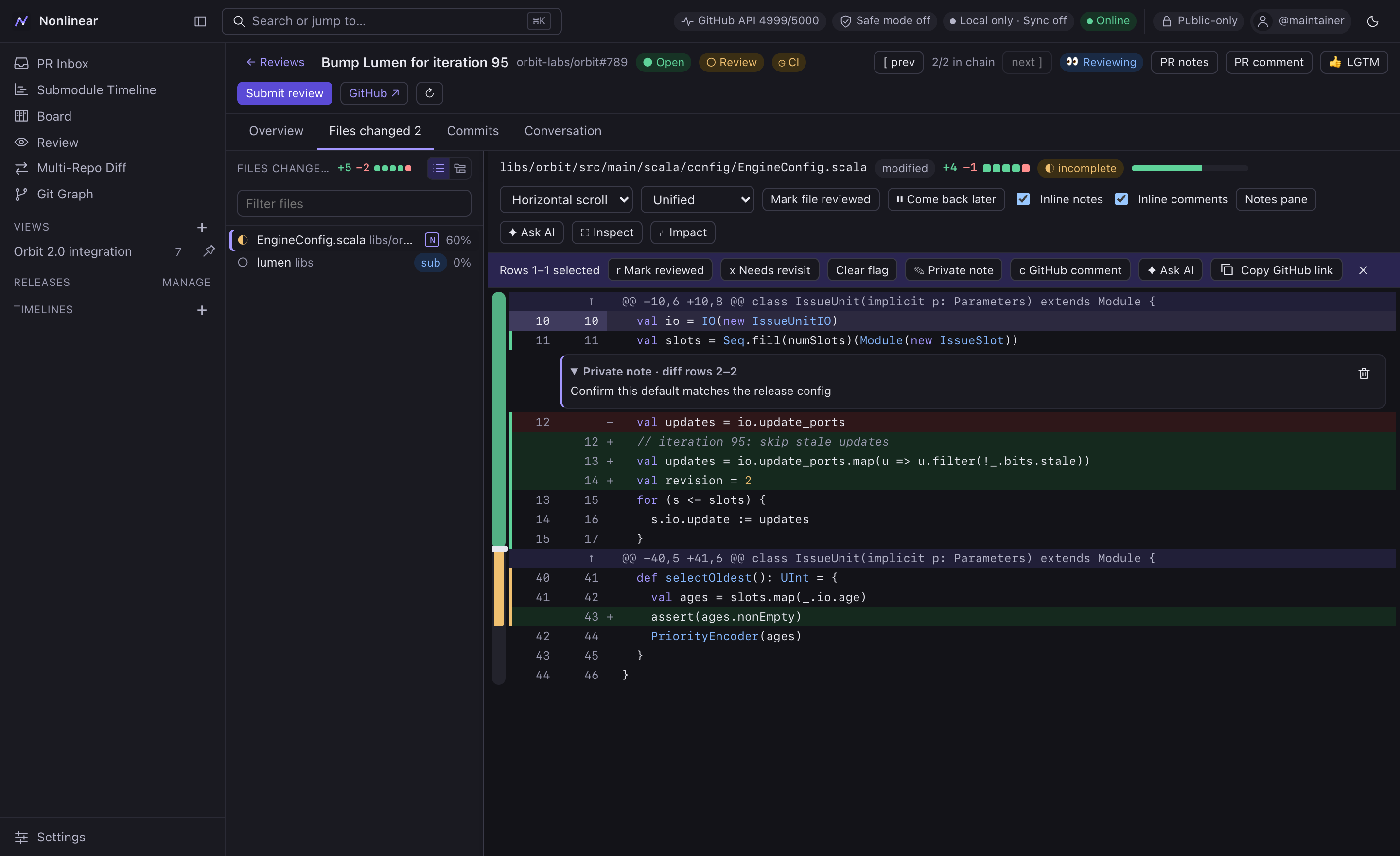
Nonlinear's Review tab: a file list with diff stats beside a code diff, two selected lines with a selection toolbar (Mark reviewed, Private note, GitHub comment, Ask AI) and an inline private note.
Why Nonlinear

Multi-repo releases are a graph,
not a list.

GitHub shows you one repository at a time. Your release depends on twelve of them, nested three submodules deep. Nonlinear is built for how that work actually fits together.

No GitHub App

Nothing is installed into anyone's org. You sign in with your own account, and GitHub stays the source of truth for PRs, reviews and permissions.

Local-first

Notes, review progress, release plans and cards live on your devices. It works offline, and sync is end-to-end encrypted.

Submodule-native

Gitlinks, nested pins and cross-repo dependencies are built into the app, not bolted on afterwards. It was built for projects with dozens of nested repositories.

Inbox & dependency chains

Know exactly why a PR isn't ready to merge.

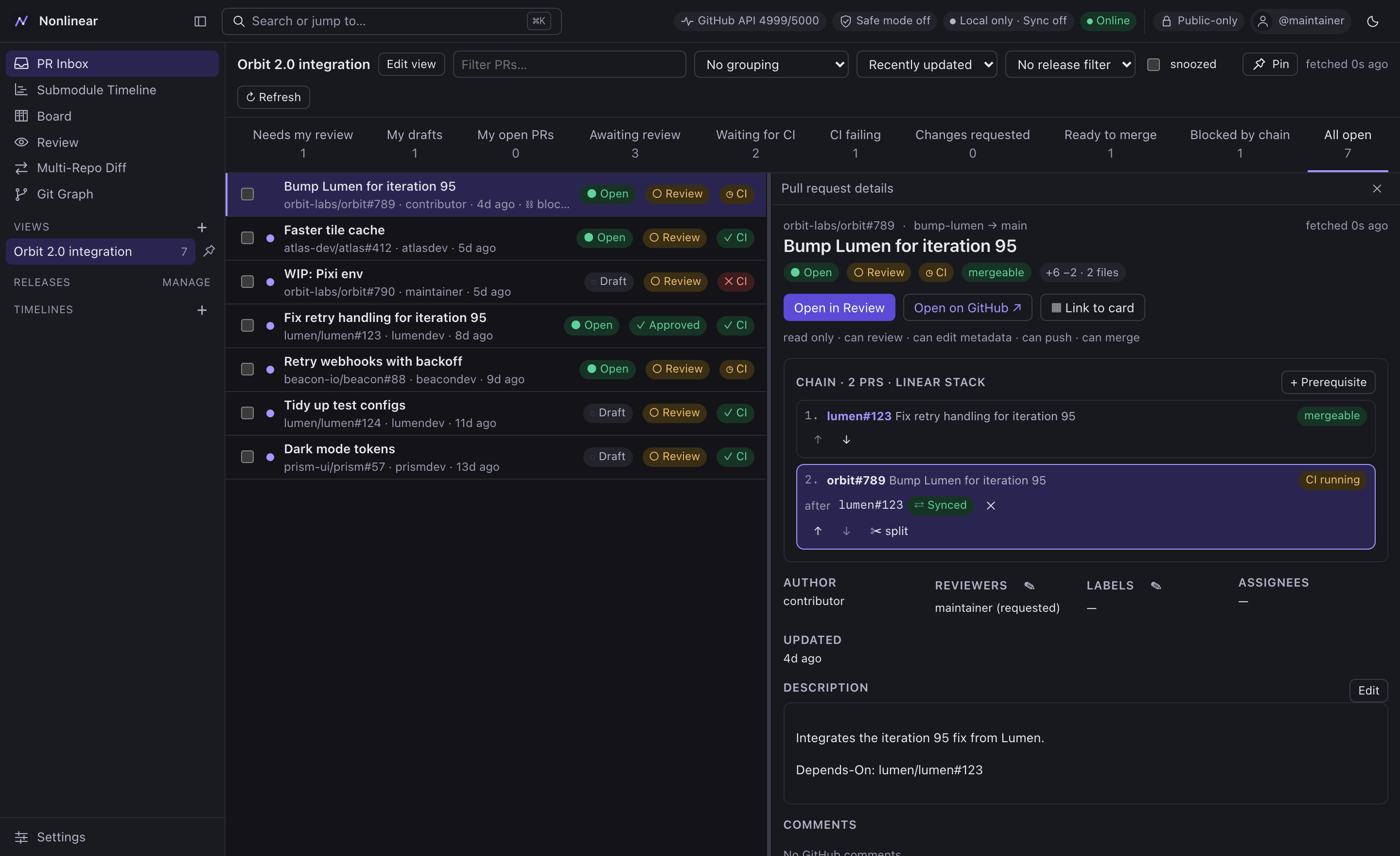
One inbox for every repo you maintain, sorted into categories you can edit. Write Depends-On: org/repo#123 in a PR body, or build the chain in the UI, and Nonlinear tracks the stack across repositories.

  • Needs my review, CI failing, blocked by chain, ready to merge…
  • A managed chain block stays in sync in every member PR
  • Your permissions on each repo are checked before any write
The PR Inbox with category tabs, a list of PRs across several repositories, and a details pane showing a two-PR linear stack.
Review

Review huge diffs without losing your place.

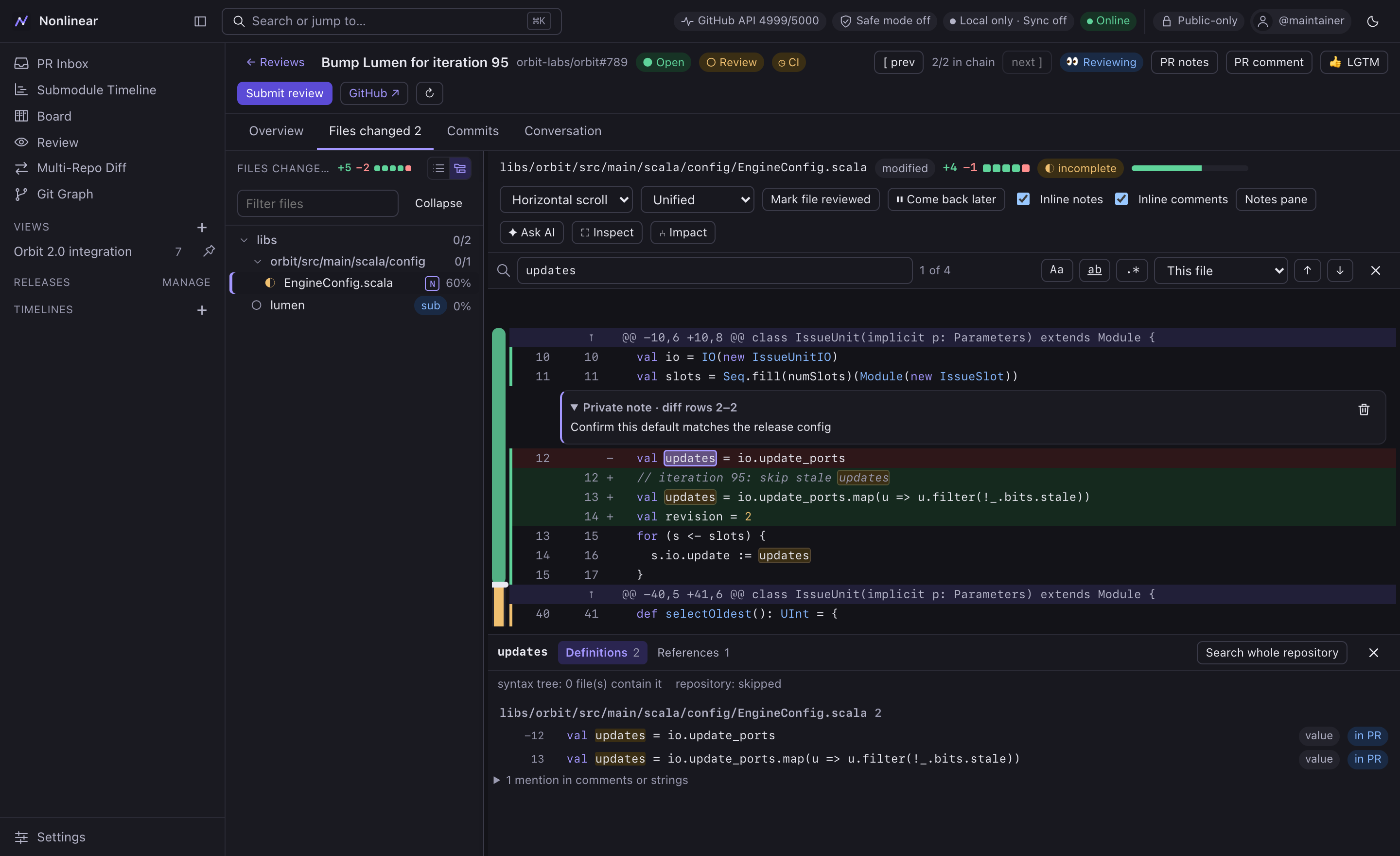
A frontier rail tracks which hunks you've actually read. When the author force-pushes, your progress follows each hunk, and only what changed is marked stale.

  • ⌘-click any identifier for its definitions and references, in any language: across the PR, the full changed files and the rest of the repo, confirmed by a language server when you have one
  • ⌘F searches the code itself, even in files with hundreds of thousands of lines, with match case, whole word, regex and all-files modes
  • Browse changed files as a flat list or a folder tree
  • Private notes and draft comments inline; Ask AI about a line or a range
  • LGTM in one click; GitHub shows you as reviewing when you start
The Review tab with the changed files shown as a folder tree, a find bar highlighting four matches of “updates”, and a panel listing the definitions of “updates”.
Submodule timeline

Pin every submodule from one screen.

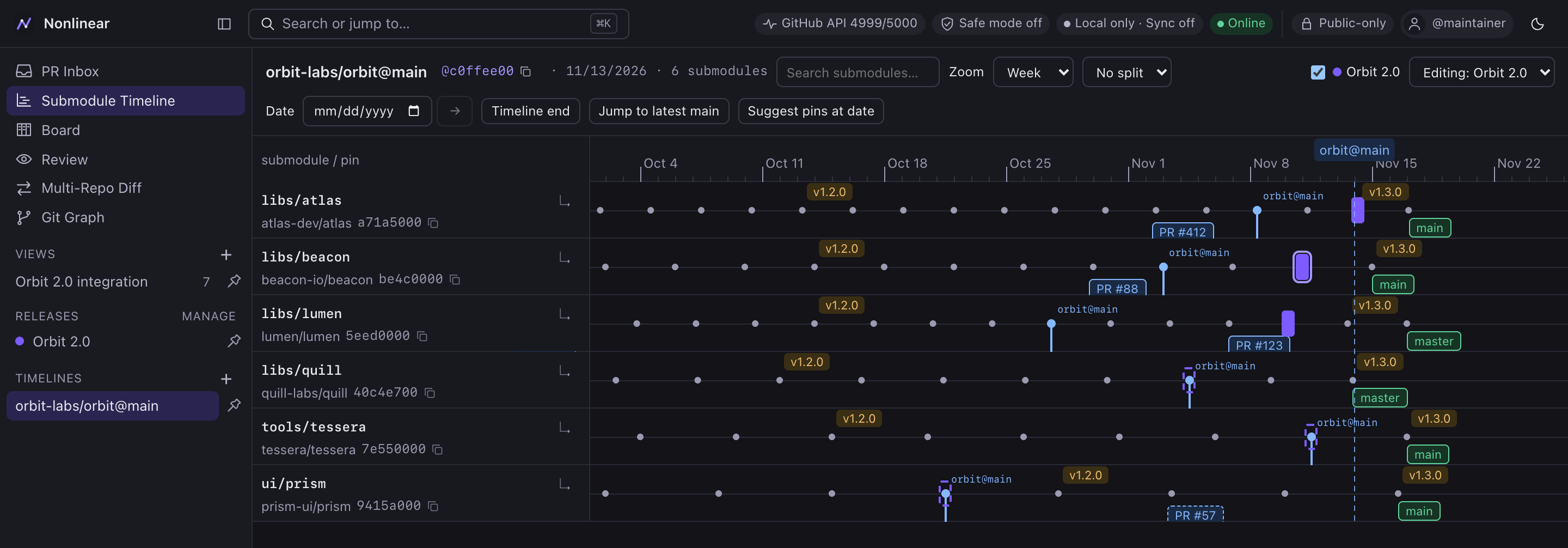
Each submodule gets a row on a shared calendar, with commits, tags, branch tips and open PRs. Drag a release handle along each row; daily and weekly ticks show exactly where you are.

  • Timeline end and Jump to latest main move the view without touching your pins
  • Suggest pins at a date, then fine-tune by hand
  • Split view with a shared crosshair for child timelines
The Submodule Timeline with a row per submodule, tags, branch tips, PR markers and a release pin handle.
Releases

Release notes that write themselves.

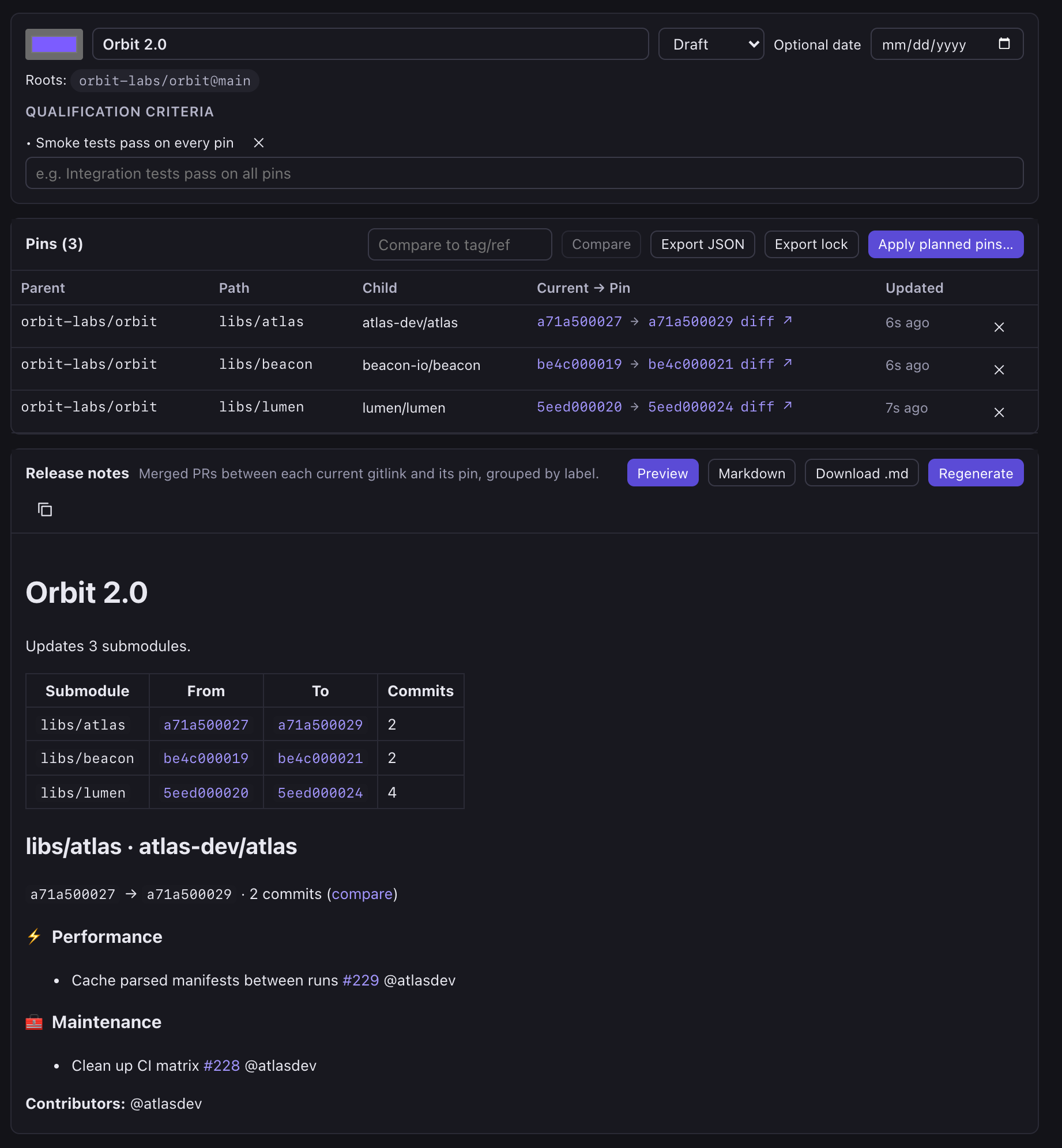
Every pin shows the current gitlink → the planned one, linked to GitHub with a one-click compare. Nonlinear collects the PRs merged in between and groups them by label, the way release-drafter does.

  • Preview, edit as Markdown, copy or download
  • Export a manifest or lock file
  • Open a draft PR that bumps every gitlink at once
A release with a pin table showing current and planned SHAs, and generated release notes below.
Safe mode

Try anything. Send nothing until you say so.

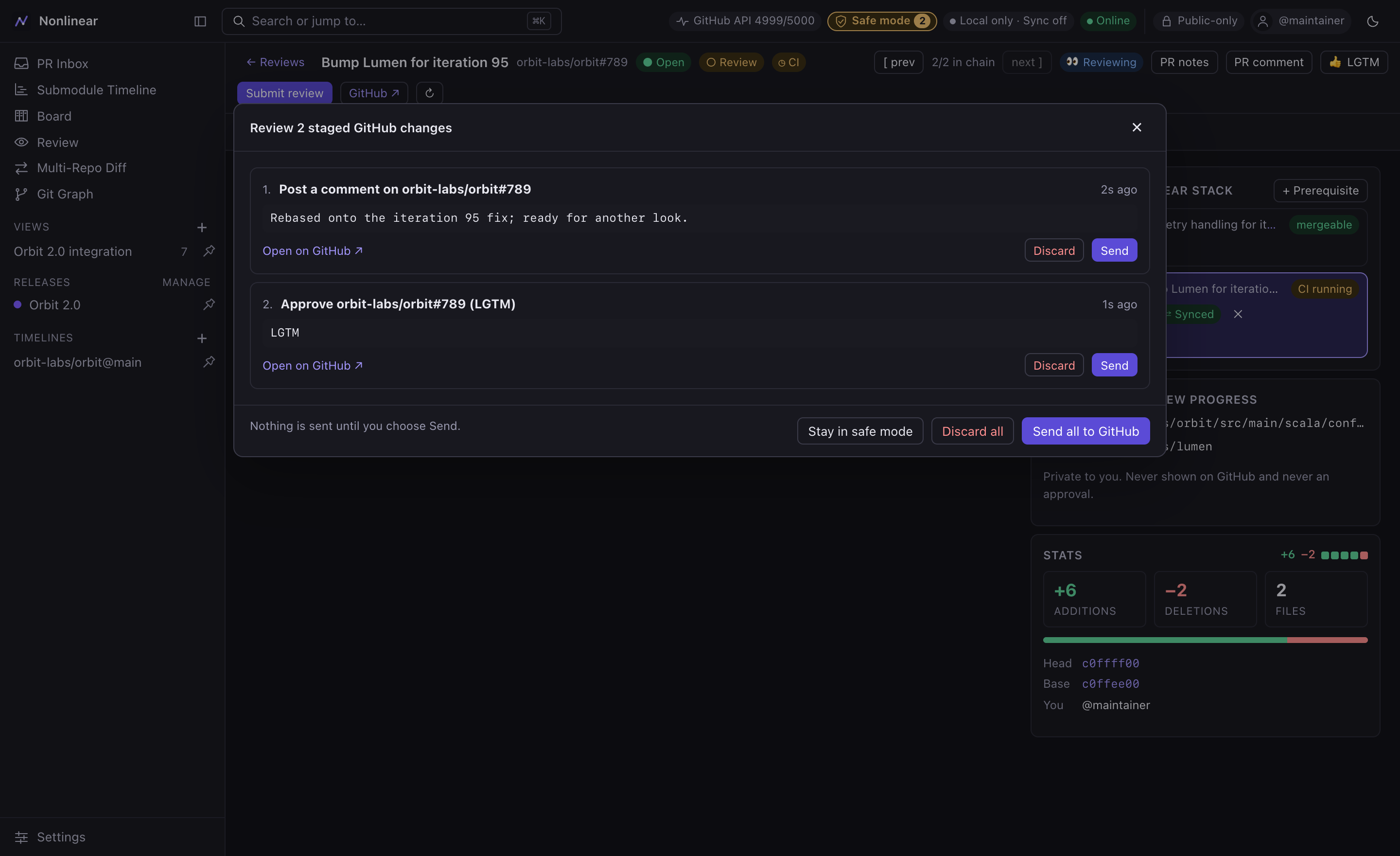
Turn on safe mode from the top bar and every GitHub write is staged instead of sent: comments, reviews, approvals, chain updates. When you leave safe mode, you go through them one by one.

  • Send or discard each change, or all at once
  • Staged changes survive a restart
  • Offline writes queue up the same way
The 'Review 2 staged GitHub changes' dialog listing a comment and an LGTM approval, each with Discard and Send buttons.
Multi-repo diff

One diff across the root repo and every submodule.

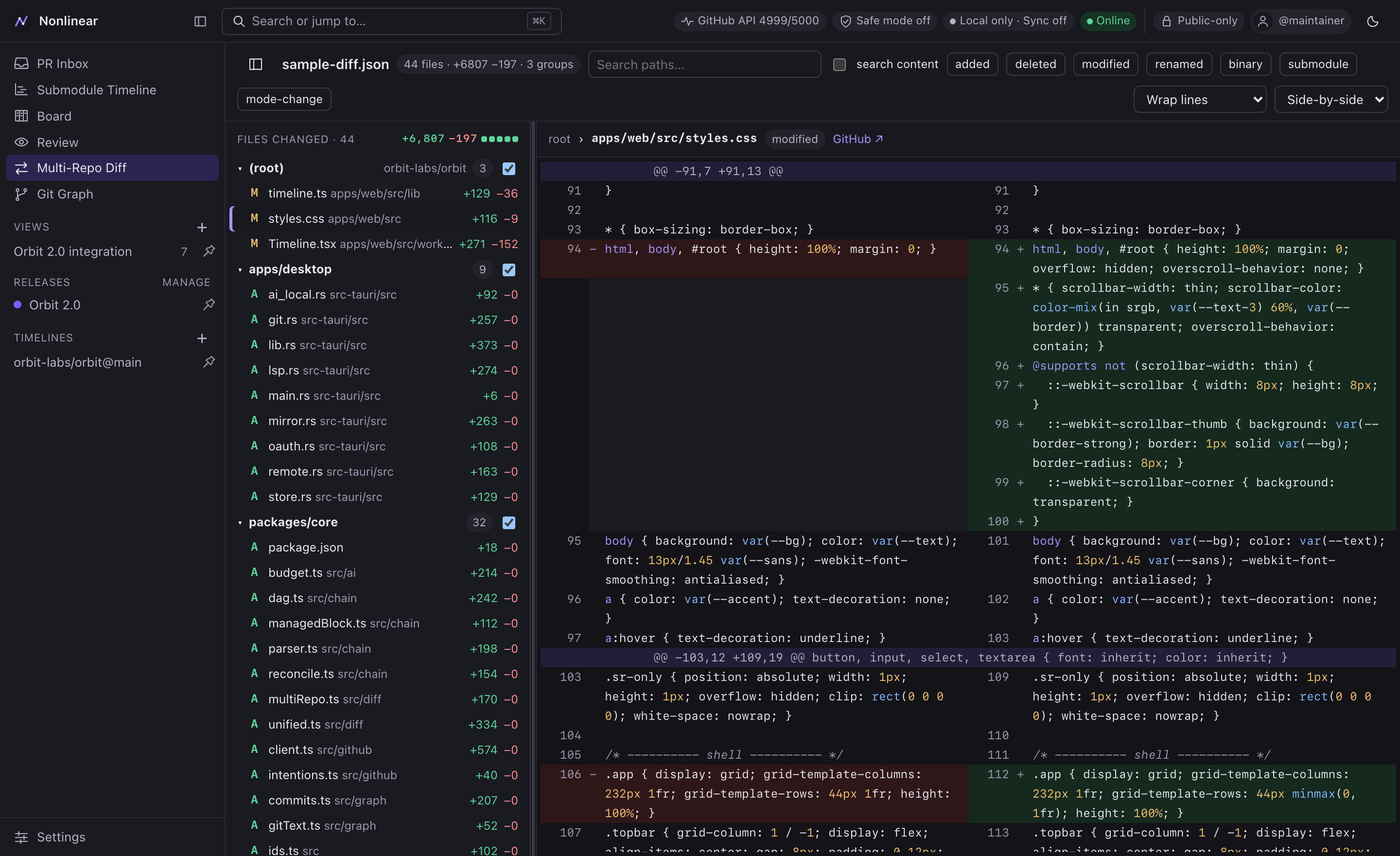
Import a JSON diff keyed by submodule path. A 51 MB, 3,500-file import is indexed in about 280 ms, saved locally and reopens instantly offline.

  • Unified or side-by-side, with wrapping
  • Filter by status or search file contents
  • j / k step through files
The Multi-Repo Diff viewer with files grouped by root, apps/desktop and packages/core, and a side-by-side diff.
Git graph

See history, tags and pins together.

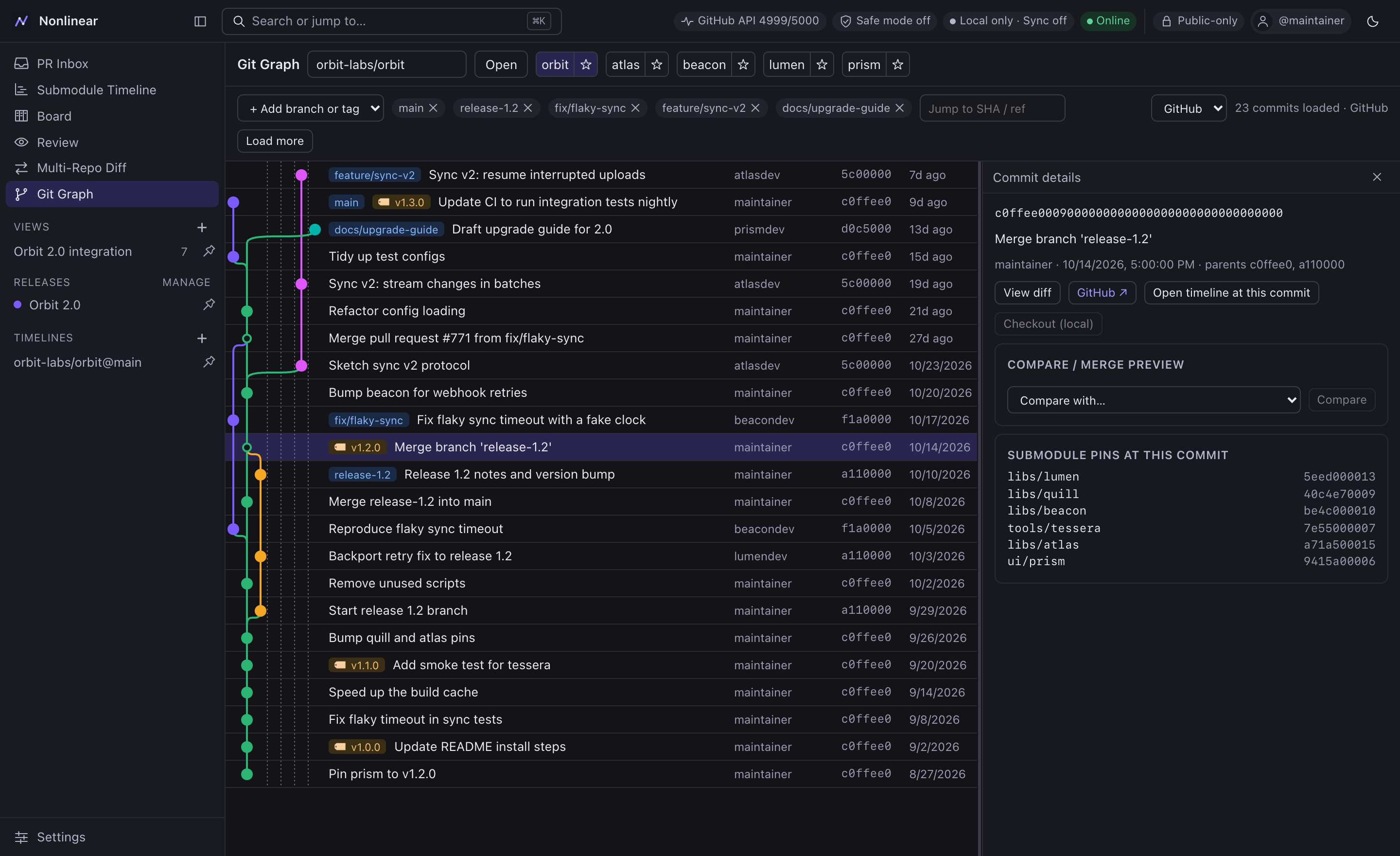
A lane graph with refs, PRs and the submodule pins at each commit. Data comes from the GitHub API, your working tree, or a remote machine over SSH.

  • Commit diffs, compare and merge previews
  • Open the timeline at any commit
  • Star the repos you jump between
The Git Graph with a commit selected, showing its details and submodule pins.
And everything else

The rest of the workbench.

🎨 Make it yours

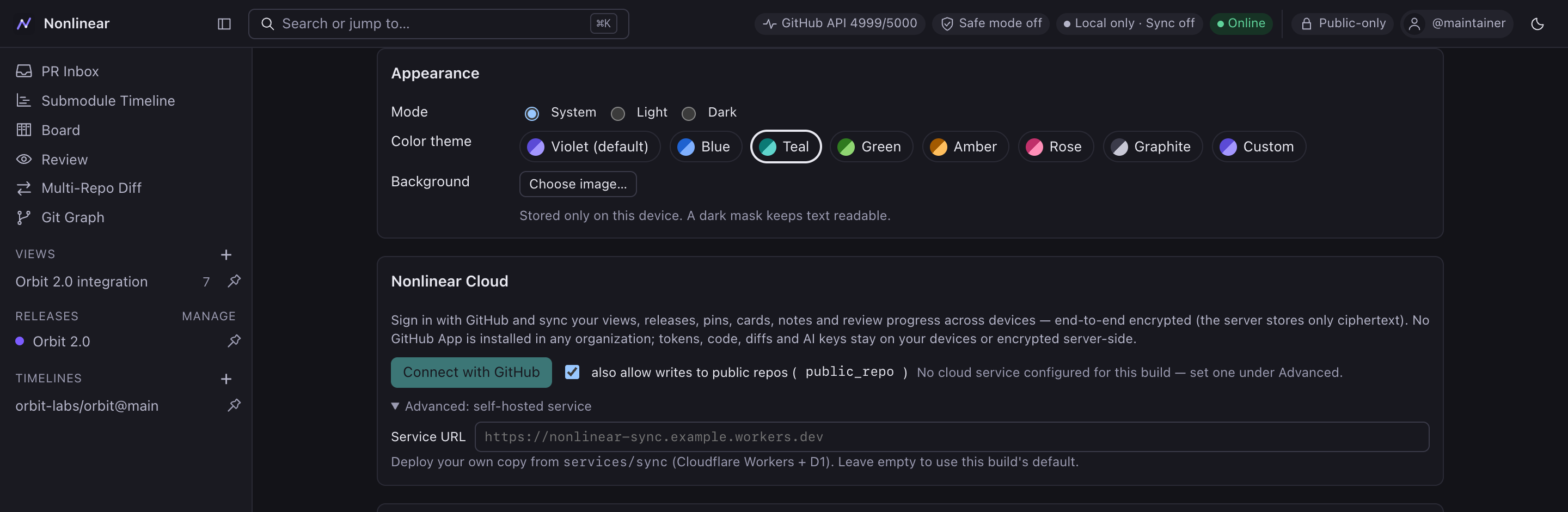
Seven color themes or a custom color, light or dark, and an optional background image with a darkness slider.

✨ AI on your terms

Your own API key or a local Claude Code or Codex CLI. You see every prompt and its cost first, and a hard budget cap stops spending.

🔌 Share with MCP

On desktop, share a review selection with your local MCP clients for 30 minutes, then stop with one click.

🗂 Kanban board

Cards link PRs, releases and checklists. The same card can sit in different places on different boards.

⌨️ Keyboard first

⌘K or ⌘P for the command palette, ⌘F to search code, ⌘-click to jump to a definition, and shortcuts for every review action.

💾 Backup, restore, erase

Export all your local data to one file and restore it on another machine, or erase everything the app keeps on this device.
Settings → Appearance with mode, color theme swatches (teal selected) and a background image picker.
Release notes

What's new.

The latest releases of the macOS app. Downloads are on the GitHub releases page.

0.1.16November 23, 2026Latest

New

  • Add a repository's submodules to a view. When creating or editing a view, one click adds every submodule repository of a selected repository, including nested ones if you like.
  • AI chat on the Review tab. Open a chat panel about the whole PR from the toolbar, and pick up any earlier conversation about that PR, whether about specific lines or the whole thing. Conversations are saved on your device.

Improved

  • Turning on AI now covers every repository. Per-repository settings are only for keeping files out of prompts, or * to turn AI off for a repository.
  • Whole-PR summaries leave out files you've excluded from AI.

Fixed

  • AI summaries no longer come back blank when a model spends its whole budget reasoning: Nonlinear retries with more room, or tells you what happened.
  • PRs whose prerequisite is in a repository outside the view, and already merged, are no longer shown as “Blocked by chain”.
  • Repositories added to a view load their PRs right away, and grouping by repository lists the ones with no open PRs.
  • With a background image, the Review tab's code area is evenly tinted instead of patchy, and the space for the selection bar matches the toolbar when no lines are selected.
0.1.15November 23, 2026

New

  • Type any repository. Every place that asks for a repository suggests your starred and recent ones first, and searches GitHub when you type one Nonlinear hasn't seen yet.
  • Review progress in the inbox. PRs you've started reviewing show how much you've reviewed, with a ⟳ when new commits arrived since.

Improved

  • In side-by-side review, selecting lines selects whole rows, so marking them reviewed covers deleted and added lines alike. GitHub comments still go on the side you clicked.
  • The Review tab opens on your first starred repository.
  • Recent activity shows when changes happened on GitHub, not when Nonlinear noticed them.
  • macOS asks for Keychain access at most once per launch instead of repeatedly.

Fixed

  • Clicking a suggestion in the Git Graph's repository box now opens it.
  • The sync service URL and GitHub API base fields accept // while you type.
0.1.14November 23, 2026

New

  • Work in organizations that block OAuth apps. Some organizations only allow OAuth apps an owner has approved, so comments and reviews there used to fail even though your account had access. Add a fallback personal access token under Settings → GitHub access, and Nonlinear uses it for just those organizations while keeping your normal sign-in everywhere else.

Improved

  • When an organization blocks the app, the error explains both fixes: ask an owner to approve it, or add a fallback token.
  • Repeat reads in those organizations reuse cached answers, so they barely touch your GitHub rate limit.
Privacy & security

Your notes never leave your devices unencrypted.

Nonlinear is designed so that we couldn't read your data even if we wanted to.

🔐 End-to-end-encrypted sync

Data is encrypted with AES-GCM before it's uploaded. New devices pair by approval with a matching 6-digit code, or with a recovery key.

🪪 Minimal GitHub scope

OAuth only asks for public_repo, and over-scoped tokens are refused. In the browser, your token never reaches the page.

✋ Nothing sent without you

Chain blocks, labels, reviews and PRs are all previewed and need your confirmation. Safe mode stages every write for review, and offline writes wait in a queue.

🏠 Self-hostable

There's no shared server: your team runs its own sync service, a single Cloudflare Worker backed by D1, and decides exactly which GitHub accounts may use it.

Spend less time on release day.

Download the macOS app, or build the web app from source.

$ git clone https://github.com/jimfangx/Nonlinear
$ cd Nonlinear && npm install && npm run dev